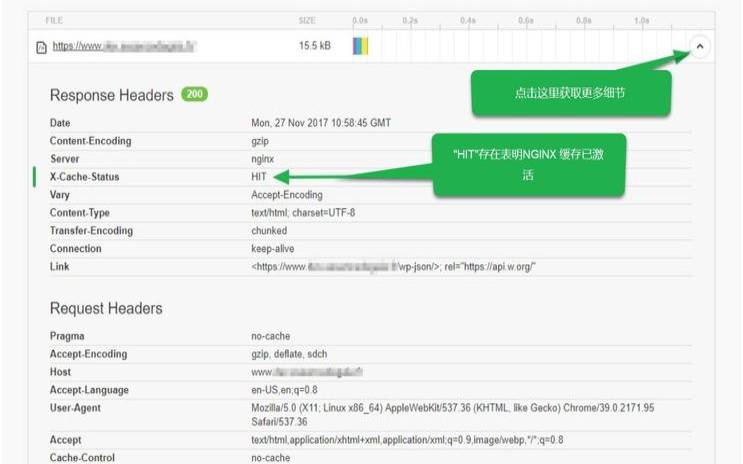


使用nginx做cache服务器
需求就是缓存android的软件包,后缀名是apk。话不多说,直接上配置,供参考:
error_log/data/logs/nginx_error.logcrit;
pid/usr/local/nginx/nginx.pid;
worker_rlimit_nofile204800;
worker_connections204800;
#default_typeapplication/vnd.android.package-archive;
default_typeapplication/octet-stream;
server_names_hash_bucket_size128;
client_header_buffer_size2k;
large_client_header_buffers44k;
open_file_cachemax=204800inactive=20s;
open_file_cache_min_uses1;
open_file_cache_valid30s;
client_body_buffer_size512k;
#跟后端服务器连接的超时时间_发起握手等候响应超时时间
proxy_connect_timeout600;
#连接成功后_等候后端服务器响应的时间_其实已经进入后端的排队之中等候处理
#后端服务器数据回传时间_就是在规定时间内后端服务器必须传完所有数据
#代理请求缓存区_这个缓存区间会保存用户的头信息以供nginx进行规则处理_一般只要能保存下头信息即可
#同上告诉nginx保存单个用的几个buffer最大用多大空间
#如果系统很忙的时候可以申请更大的proxy_buffers官方推荐*2
proxy_busy_buffers_size128k;
proxy_temp_file_write_size128k;
gzip_proxiedexpiredno-cacheno-storeprivateauth;
gzip_typestext/plainapplication/x-javascripttext/cssapplication/xml;
gzip_disable"msie[1-6]\.";
#log_formataccess'$remote_addr-$remote_user[$time_local]'
#'"$request"$status$body_bytes_sent'
#'"$http_referer""$http_user_agent"'
#'$host$request_time$http_x_forwarded_for';
#access_log/data/logs/http.a.log;
#error_log/data/logs/http.e.log;
includevhosts/cache.peiqiang.net.conf;
server192.168.1.1:80weight=7max_fails=2fail_timeout=30s;
server192.168.1.2:80weight=4max_fails=2fail_timeout=30s;
b-->cache.peiqiang.net.conf
#用于指定本地目录来缓冲较大的代理请求
proxy_temp_path/data/soft/temp;
#设置web缓存区名为cache_one,内存缓存空间大小为12000m,自动清除超过15天没有被访问过的缓存数据,硬盘缓存空间大小200g
proxy_cache_path/data/soft/cachelevels=1:2keys_zone=cache_one:12000minactive=15dmax_size=200g;
server_namecache.peiqiang.net;
access_log/data/logs/a.log;
error_log/data/logs/e.lognotice;
#phpscriptsisnotallowedwithinthissite!
location~*\.(php|php5|jsp|asp|aspx)${
proxy_next_upstreamhttp_500http_502http_503http_504errortimeoutinvalid_header;
proxy_cache_valid20030412h;
proxy_cache_key$uri$is_args$args;
#反向代理,访问后端内容源服务器
proxy_set_headerhost$host;
proxy_set_headerx-forwarded-for$remote_addr;
proxy_passhttp://source_site;
error_page302404=@fallback;
#如果后端的服务器返回500、502、503、504执行超时等错误、自动将请求转发到upstream负载均衡池中的另一台服务器,实现故障转移

#对不同的http状态码缓存设置不同的缓存时间
proxy_cache_valid20030412h;
#设置web缓存的key值,nginx根据key值md5哈希存储缓存,这里根据"域名、uri、参数"组合成key
proxy_cache_key$uri$is_args$args;
#反向代理,访问后端内容源服务器
proxy_set_headerhost$host;
proxy_set_headerx-forwarded-for$remote_addr;
proxy_passhttp://source_site;
rewrite^$scheme://apke.peiqiang.net$uriredirect;
}
说明:其实按这个配置location/这个匹配是多余的,因为过来一个后缀名为apk的软件包location~*.*\.(apk)$已经给匹配上了,不会再到location/了,不过由于我们还会缓存些其他后缀名的文件,所以location/就是必须的。
#thisscriptwillbeexecuted*after*alltheotherinitscripts.
#youcanputyourowninitializationstuffinhereifyoudon't
#wanttodothefullsysvstyleinitstuff.
touch/var/lock/subsys/local
/usr/local/nginx/sbin/nginx
删除nginx缓存文件一:脚本
#1.本脚本用于清除nginx缓存文件
#2.查看你的nginx是根据什么作为key来hash的,我的设置是proxy_cache_key$uri$is_args$args;
#因此nginx会根据$uri$is_args$args作为key进行hash,因此可以模拟nginx对一个key进行再
#hash找到相应的文件路径,删除(具体可随意找个缓存文件more一下看看)
#3.缓存设置proxy_cache_path/data/mumayi/cachelevels=1:2keys_zone=cache_one:6000minactive=15dmax_size=200g;
#根据相应的配置,请做相应修改测试
#4.uri格式请按照同级目录下rm_apk_list.txt中填写
md5uri=`echo-n$line|md5sum|awk'{print$1}'`
filepath=`echo"$md5uri"|awk'{print"/data/mumayi/cache/"substr($0,length($0),1)"/"substr($0,length($0)-2,2)"/"$0}'`
done</root/sbin/rm_apk_list.txt
#!/usr/local/python2.7/bin/python2.7
1.本脚本用于清除nginx缓存文件
2.查看你的nginx是根据什么作为key来hash的,我的设置是proxy_cache_key$uri$is_args$args;
因此nginx会根据$uri$is_args$args作为key进行hash,因此可以模拟nginx对一个key进行再
hash找到相应的文件路径,删除(具体可随意找个缓存文件more一下看看)
3.缓存设置proxy_cache_path/data/mumayi/cachelevels=1:2keys_zone=cache_one:6000minactive=15dmax_size=200g;
根据相应的配置,请做相应修改测试
4.uri格式请按照同级目录下rm_apk_list.txt中填写
sys.setdefaultencoding('utf-8')
project_root=os.path.dirname(os.path.abspath(__file__))
uri_file=''.join([project_root,'/rm_apk_list.txt'])
dir1=md5uri[md5uri_len-1:]
dir2=md5uri[md5uri_len-3:md5uri_len-1]
file_path=("/data/mumayi/cache/%s/%s/%s"%(dir1,dir2,md5uri))
ifos.path.exists(file_path):
withopen("%s"%uri_file,'r')asuri_file:
nginx_purge(line)
cngx_cache_purge不做考虑,据说已经停止开发了说明:
1我的/root/sbin/rm_apk_list.txt文件
[root@budong~]#cat/root/sbin/rm_apk_list.txt
/2013/08/15/38/382272/shuazanzhushou_v1.8.16_mumayi_95a91.apk
2查看一个缓存对象,应该有些明白了吧
[root@budong~]#more/data/mumayi/cache/0/00/db9327b60a6b3c164516117f90d9d000
key:/2013/10/23/43/432816/dinuochongwudinopets_v1.1.1_mumayi_0b399.apk
date:sun,15dec201319:51:22gmt
content-type:application/vnd.android.package-archive
last-modified:wed,23oct201306:15:06gmt
expires:wed,18dec201317:35:07gmt
cache-control:max-age=604800
accept-ranges:bytes
以上就是如何使用Nginx作缓存服务器及删除其缓存文件的详细内容,更多请关注主机测评网其它相关文章!
本文来源:国外服务器--清除nginx服务器缓存
本文地址:https://www.idcbaba.com/guowai/3169.html
版权声明:本文内容由互联网用户自发贡献,该文观点仅代表作者本人。本站仅提供信息存储空间服务,不拥有所有权,不承担相关法律责任。如发现本站有涉嫌抄袭侵权/违法违规的内容, 请发送邮件至 1919100645@qq.com 举报,一经查实,本站将立刻删除。


