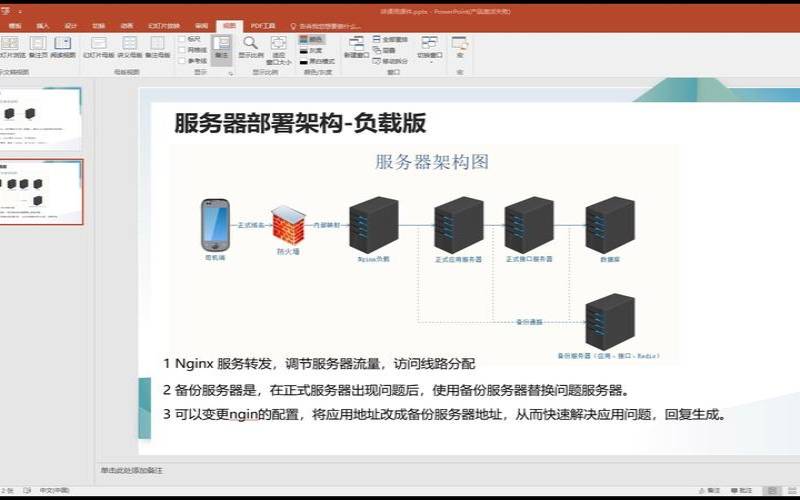


具备Squid等专业缓存软件的缓存功能
1.3Nginx软件的主要功能应用
2.1Nginx作为Web服务器应用场景
使用Nginx运行HTML、JS、CSS、小图片等静态数据
Nginx结合FastCGI运行PHP等动态程序
Nginx结合Tomcat/Resin等支持Java动态程序
工作中,根据需求来选择合适的业务服务软件:
静态业务:高并发场景,首选采用Nginx
动态业务:Nginx与Apache都可,建议Nginx
安装方法多种,本文使用编译安装方式。如果需要大规模部署,可将业务需求定制好rpm包,然后通过Ansible安装。
2.6.32-754.el6.x86_64
采用yum方式安装pcre:
yum-yinstallpcrepcre-devel
rpm-qapcrepcre-devel
pcre-devel-7.8-7.el6.x86_64pcre-7.8-7.el6.x86_64
检查是否装有openssl、openssl-devel:
rpm-qaopensslopenssl-devel
结果:如果没有,使用yum安装
openssl-1.0.1e-57.el6.x86_64
openssl-devel-1.0.1e-57.el6.x86_64
创建nginx包存放目录:
cd/server/tools/
useraddnginx-s/sbin/nologin-M
解压软件包并进入解压后的目录:
cdnginx-1.8.1
make
makeinstall
创建软链接:方便使用以及版本升级
ln-s/app/nginx-1.8.1//app/nginx
启动前测试:
/app/nginx/sbin/nginx-t
nginx:theconfigurationfile/app/nginx-1.8.1//conf/nginx.confsyntaxisoknginx:configurationfile/app/nginx-1.8.1//conf/nginx.conftestissuccessful
启动Nginx服务并检查端口:
netstat-utpln|grep80
tcp000.0.0.0:800.0.0.0:*LISTEN13689/nginx
检查Nginx启动结果:以下内容代表启动成功
<title>Welcometonginx!</title>
font-family:Tahoma,Verdana,Arial,sans-serif;
<h2>Welcometonginx!</h2>
<p>Ifyouseethispage,thenginxwebserverissuccessfullyinstalledand
working.Furtherconfigurationisrequired.</p>
<p>Foronlinedocumentationandsupportpleasereferto
<ahref="http://nginx.org/"rel="externalnofollow">nginx.org</a>.<br/>
Commercialsupportisavailableat

<p><em>Thankyouforusingnginx.</em></p>
</html>
4.Nginx目录结构与配置文件
tree/app/nginx
/app/nginx
├──conf #nginx配置文件目录
│├──fastcgi.conf #fastcgi相关参数配置文件
│├──fastcgi.conf.default
│├──fastcgi_params #fastcgi参数文件
│├──fastcgi_params.default
│├──mime.types #媒体类型
│├──mime.types.default
│├──nginx.conf #Nginx主配置文件
│├──nginx.conf.default
│├──scgi_params #scgi配置文件
│├──scgi_params.default
│├──uwsgi_params #uwsgi配置文件
│├──uwsgi_params.default
├──fastcgi_temp #fastcgi临时数据文件
├──html #默认站点目录
│├──50x.html #错误页面显示文件
│└──index.html #默认的站点首页文件
├──logs #默认日志路径
│├──access.log #默认访问日志文件
│├──error.log #默认错误日志文件
│└──nginx.pid #Nginx的pid文件
├──proxy_temp #临时目录
├──sbin #Nginx命令目录
│├──nginx #启动命令
├──scgi_temp #临时目录
└──uwsgi_temp #临时目录
9directories,22files
4.2Nginx主配置文件
worker_connections1024;#单worker进程支持的最大连接
includemime.types;#支持的媒体类型库
default_typeapplication/octet-stream;#默认媒体类型
sendfileon;#开启高效传输模式
keepalive_timeout65;#连接超时
listen80;#服务端口,默认80
server_namelocalhost;#域名主机名
location/{#location区块开始
indexindex.htmlindex.htm;#默认首页文件
error_page500502503504/50x.html;#对应状态码及回应
location=/50x.html{#location开始回应50x.html
}#HTTP区块结束
注:server区块和location区块可以是多个。
以上就是如何部署Nginx服务的详细内容,更多请关注主机测评网其它相关文章!
本文来源:国外服务器--如何部署Nginx服务(nginx部署linux)
本文地址:https://www.idcbaba.com/guowai/3331.html
版权声明:本文内容由互联网用户自发贡献,该文观点仅代表作者本人。本站仅提供信息存储空间服务,不拥有所有权,不承担相关法律责任。如发现本站有涉嫌抄袭侵权/违法违规的内容, 请发送邮件至 1919100645@qq.com 举报,一经查实,本站将立刻删除。


