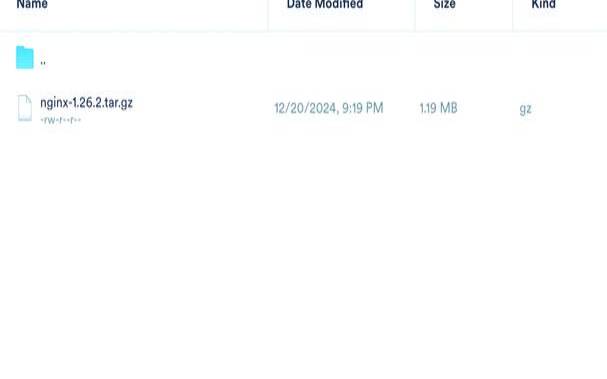


1.下载
在linux下安装需要安装一下组件
yuminstall-ypcrepcre-devel
yuminstall-yzlibzlib-devel
yuminstall-yopensslopenssl-devel
2.2安装
tar-zxvfnginx-1.17.5.tar.gz
https://www.fruan.com/post/configure--prefix=/home/lege/nginx
#安装完成后内容会安装到指定的路径/home/lege/nginx下,否则会在默认目录/usr/local/nginx
2.3启动nginx
设置端口为8080,也可设置成其他
https://www.fruan.com/post/nginx-t
[soa@testsoa04sbin]$https://www.fruan.com/post/nginx-t
nginx:theconfigurationfile/home/lege/nginx/conf/nginx.confsyntaxisok
nginx:configurationfile/home/lege/nginx/conf/nginx.conftestissuccessful
https://www.fruan.com/post/nginx-v
对于已安装的nginx需要修改配置参数
https://www.fruan.com/post/configure--prefix=/home/lege/nginx...配置参数
https://www.fruan.com/post/nginx
https://www.fruan.com/post/nginx-sstop
https://www.fruan.com/post/nginx-sreload
http://ip:port/
3.nginx日志相关配置
语法格式:access_logpath[format[buffer=size][gzip[=level]][flush=time][if=condition]];
默认值:access_loglogs/access.logcombined;
作用域:http,server,location,ifinlocation,limit_except
语法格式:log_formatname[escape=default|json]string...;
默认值:log_formatcombined"...";
$remote_addr,$http_x_forwarded_for记录客户端ip地址
$remote_user记录客户端用户名称
$request记录请求的url和http协议(get,post,del,等)
$body_bytes_sent发送给客户端的字节数,不包括响应头的大小;该变量与apache模块mod_log_config里的“%b”参数兼容。
$bytes_sent发送给客户端的总字节数。

$connection_requests当前通过一个连接获得的请求数量。
$msec日志写入时间。单位为秒,精度是毫秒。
$pipe如果请求是通过http流水线(pipelined)发送,pipe值为“p”,否则为“.”。
$http_referer记录从哪个页面链接访问过来的
$http_user_agent记录客户端浏览器相关信息
$request_length请求的长度(包括请求行,请求头和请求正文)。
$request_time请求处理时间,单位为秒,精度毫秒;从读入客户端的第一个字节开始,直到把最后一个字符发送给客户端后进行日志写入为止。
$time_iso8601iso8601标准格式下的本地时间。
$time_local通用日志格式下的本地时间。
log_formatmain'$remote_addr-$remote_user[$time_local]"$request"'
'$status$body_bytes_sent"$http_referer""$request_time"'
'"$http_user_agent""$http_x_forwarded_for"
对于日志相关的清理可以使用linux的定时任务去处理,示例如下:
logs_path=/home/lege/data/nginx/logs
yesterday=$(date-d"yesterday"+%y-%m-%d)
keeptime=$(date-d"-3days"+%y-%m-%d)
mv${logs_path}/access.log${logs_path}/access_${yesterday}.log
mv${logs_path}/error.log${logs_path}/error_${yesterday}.log
#通过nginx信号量控制重读日志,/web/nginx/为nginx安装目录
kill-usr1$(cat/home/lege/data/nginx/logs/nginx.pid)
rm-f${logs_path}/access_{keeptime}.log
rm-f${logs_path}/error_{keeptime}.log
00***/bin/sh/home/lege/data/nginx/logs/clear.sh
crontab-l查看是否添加成功
4.nginx使用之充当文件下载器
client_header_buffer_size8k;
client_max_body_size130m;
log_formataccess'$remote_addr$host$remote_user[$time_local]$status$request_length$body_bytes_sent$request_time000-"-""$request""$http_referer""$http_user_agent"$http_cookie$bytes_sent';
access_loglogs/access.logaccess;
default_type'application/octet-stream';
add_headercontent-disposition"attachment";
配置可以下载的文件路径,下面是在windows下测试使用的路径,linux也可换成对应的路径
rootd://tools//nginx-1.17.4//conf;
}
配置完成后重启nginx,然后进入浏览器输入下的文件名即可下载到对应的文件。ps:不能下载目录只能下载文件。
以上就是linux上nginx安装部署及使用的方法的详细内容,更多请关注主机测评网其它相关文章!
本文来源:国外服务器--linux上nginx安装部署及使用的方法(linux如何安装nginx)
本文地址:https://www.idcbaba.com/guowai/4873.html
版权声明:本文内容由互联网用户自发贡献,该文观点仅代表作者本人。本站仅提供信息存储空间服务,不拥有所有权,不承担相关法律责任。如发现本站有涉嫌抄袭侵权/违法违规的内容, 请发送邮件至 1919100645@qq.com 举报,一经查实,本站将立刻删除。


