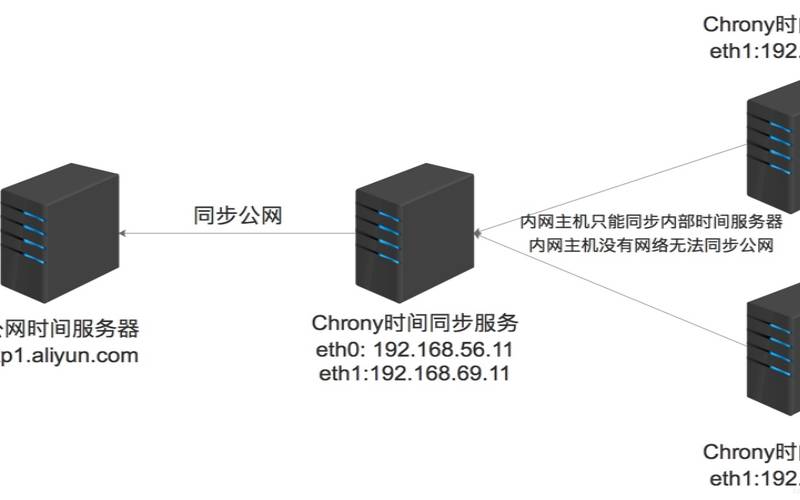


定义:chrony是网络时间协议(NTP)的通用实现。
chrony包含两个程序:chronyd是一个可以在启动时启动的守护程序。chronyc是一个命令行界面程序,用于监视chronyd的性能并在运行时更改各种操作参数。
时间概念:
UTC(UniversalTimeCoordinated):世界标准时间,属于世界统一世界
GMT(GreenwichMeanTime):英国伦敦郊区的皇家格林尼治天文台的标准时间,因为本初子午线被定义在通过那里的经线。(UTC与GMT时间基本相同,因此不做区分)
CST(ChinaStandardTime):中国标准时间,CMT+8=UTC+8=CST
DST(DaylightSavingTime):夏令时指在夏天太阳升起的比较早时,将时间拨快一小时,以提早日光的使用。
服务端和客户端均安装软件包:
yum-yinstallchronysystemctlenablechronydsystemctlstartchronyd
服务端配置,注意两个改动:
建议添加ping较低的公网服务器地址Usepublicserversfromthepool.ntp.orgproject.#Pleaseconsiderjoiningthepool(http://www.pool.ntp.org/join.html).serverntp.aliyun.comiburstservertime.asia.apple.comiburstservertime.windows.comiburstservercn.pool.ntp.orgiburst
Recordtherateatwhichthesystemclockgains/lossestime.driftfile/var/lib/chrony/drift
Allowthesystemclocktobesteppedinthefirstthreeupdatesifitsoffsetislargerthan1second.makestep1.03
Enablekernelsynchronizationofthereal-timeclock(RTC).rtcsync
Enablehardwaretimestampingonallinterfacesthatsupportit.#hwtimestamp*
指定NTP客户端地址或网段,以允许或拒绝连接到扮演时钟服务器的机器#AllowNTPclientaccessfromlocalnetwork.allow120.10.10.0/24
SpecifyfilecontainingkeysforNTPauthentication.#keyfile/etc/chrony.keys
Specifydirectoryforlogfiles.logdir/var/log/chrony
Selectwhichinformationislogged.#logmeasurementsstatisticstracking

systemctlenablechronydsystemctlrestartchronyd
开启网络时间同步timedatectlset-ntptrue
客户端配置,也注意两个改动:
Usepublicserversfromthepool.ntp.orgproject.改动1server120.10.10.10iburst
Recordtherateatwhichthesystemclockgains/lossestime.driftfile/var/lib/chrony/drift
Allowthesystemclocktobesteppedinthefirstthreeupdatesifitsoffsetislargerthan1second.makestep1.03
Enablekernelsynchronizationofthereal-timeclock(RTC).rtcsync
Enablehardwaretimestampingonallinterfacesthatsupportit.#hwtimestamp*
AllowNTPclientaccessfromlocalnetwork.#改动2allow120.10.10.10
SpecifyfilecontainingkeysforNTPauthentication.#keyfile/etc/chrony.keys
Specifydirectoryforlogfiles.logdir/var/log/chrony
Selectwhichinformationislogged.#logmeasurementsstatisticstracking
修改时区或日期时间(首先配置):
#查看日期时间、时区及NTP状态timedatectl
#查看时区列表timedatectllist-timezonestimedatectllist-timezones|?grep?-E"Asia/S.*"
#修改时区timedatectlset-timezoneAsia/Shanghai
#修改日期时间(可以只修改其中一个)timedatectlset-time"2019-09-1915:50:20"
#开启NTP,true表示开启timedatectlset-ntptrue/flase
#查看日期时间、时区及NTP状态timedatectl
#查看时区列表timedatectllist-timezonestimedatectllist-timezones|?grep?-E"Asia/S.*"
#修改时区timedatectlset-timezoneAsia/Shanghai
#修改日期时间(可以只修改其中一个)timedatectlset-time"2019-09-1915:50:20"
#开启NTP,true表示开启timedatectlset-ntptrue/flase
#查看ntp_serverschronycsources-v
#查看ntp_servers状态chronycsourcestats-v
#查看ntp_servers是否在线chronycactivity-v
#查看ntp详细信息chronyctracking-v
本文来源:国外服务器--Linux公共服务组件之时间同步chrony
本文地址:https://www.idcbaba.com/guowai/5267.html
版权声明:本文内容由互联网用户自发贡献,该文观点仅代表作者本人。本站仅提供信息存储空间服务,不拥有所有权,不承担相关法律责任。如发现本站有涉嫌抄袭侵权/违法违规的内容, 请发送邮件至 1919100645@qq.com 举报,一经查实,本站将立刻删除。


