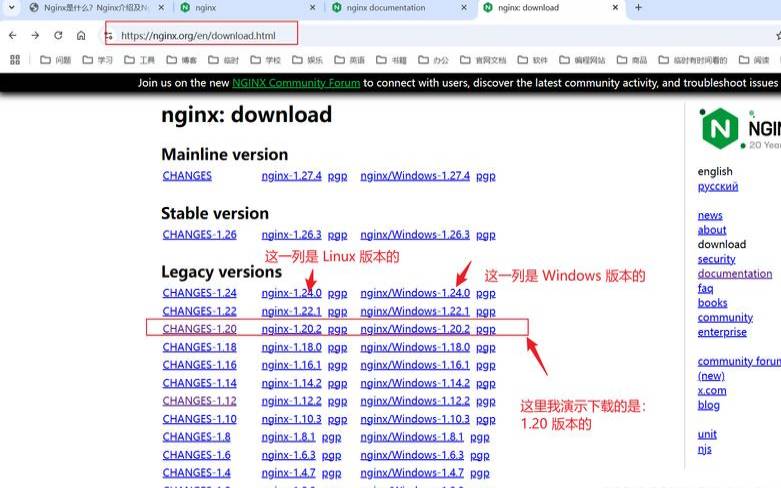


一、linux下安装配置nginx
第一次安装nginx,中间出现的问题一步步解决。
用到的工具securecrt,连接并登录服务器。
1.1rz命令,会弹出会话框,选择要上传的nginx压缩包。
[root@vw010001135067~]#cd/usr/local/
[root@vw010001135067local]cdnginx-1.10.2
[root@vw010001135067nginx-1.10.2]#https://www.fruan.com/post/configure
报错如下:
+linux2.6.32-431.el6.x86_64x86_64
checkingforccompiler...notfound
https://www.fruan.com/post/configure:error:ccompilerccisnotfound
出现这个错误。那么就是gcc包没有安装。
[root@vw010001135067nginx-1.10.2]#whereisgcc
[root@vw010001135067nginx-1.10.2]whereisgcc
gcc:/usr/bin/gcc/usr/lib/gcc/usr/libexec/gcc/usr/share/man/man1/gcc.1.gz
[root@vw010001135067nginx-1.10.2]#https://www.fruan.com/post/configure
+linux2.6.32-431.el6.x86_64x86_64
checkingforccompiler...found
checkingforpcrelibrary...notfound
checkingforpcrelibraryin/usr/local/...notfound
checkingforpcrelibraryin/usr/include/pcre/...notfound
checkingforpcrelibraryin/usr/pkg/...notfound
checkingforpcrelibraryin/opt/local/...notfound
https://www.fruan.com/post/configure:error:thehttprewritemodulerequiresthepcrelibrary.
youcaneitherdisablethemodulebyusing--without-http_rewrite_module
option,orinstallthepcrelibraryintothesystem,orbuildthepcrelibrary
staticallyfromthesourcewithnginxbyusing--with-pcre=<path>option.
error:thehttpgzipmodulerequiresthezliblibrary.
youcaneitherdisablethemodulebyusing--without-http_gzip_module
option,orinstallthezliblibraryintothesystem,orbuildthezliblibrary
staticallyfromthesourcewithnginxbyusing--with-zlib=<path>option.
[root@vw010001135067nginx-1.10.2]#https://www.fruan.com/post/configure
+linux2.6.32-431.el6.x86_64x86_64
checkingforccompiler...found
+gccversion:4.4.720120313(redhat4.4.7-17)(gcc)
+md5:usingsystemcryptolibrary
+sha1:usingsystemcryptolibrary
nginxpathprefix:"/usr/local/nginx"
nginxbinaryfile:"/usr/local/nginx/sbin/nginx"
nginxmodulespath:"/usr/local/nginx/modules"
nginxconfigurationprefix:"/usr/local/nginx/conf"
nginxconfigurationfile:"/usr/local/nginx/conf/nginx.conf"
nginxpidfile:"/usr/local/nginx/logs/nginx.pid"
nginxerrorlogfile:"/usr/local/nginx/logs/error.log"
nginxhttpaccesslogfile:"/usr/local/nginx/logs/access.log"
nginxhttpclientrequestbodytemporaryfiles:"client_body_temp"
nginxhttpproxytemporaryfiles:"proxy_temp"
nginxhttpfastcgitemporaryfiles:"fastcgi_temp"
nginxhttpuwsgitemporaryfiles:"uwsgi_temp"
nginxhttpscgitemporaryfiles:"scgi_temp"
1.4如果你想使用openssl功能,sha1功能。那么安装openssl,sha1吧

[root@vw010001135067nginx-1.10.2]make
[root@vw010001135067nginx-1.10.2]vi/etc/profile
在配置文件中加入
exportnginx_home=/usr/local/nginx-1.10.2
exportpath=$path:$nginx_home/sbin
我开始像上面填写,结果nginx-v的时候查找不到。注意到上面我的nginx_home配置的地址不对。先找到nginx的安装地址
[root@vw010001135067nginx-1.10.2]#whereisnginx
nginx:/usr/local/nginx
还真是地址写错了,把上面的改成
exportnginx_home=/usr/local/nginx
exportpath=$path:$nginx_home/sbin
编译完保存退出并执行
[root@vw010001135067nginx-1.10.2]nginx-v
nginxversion:nginx/1.10.2
[root@vw010001135067nginx]#cd/usr/local/nginx
[root@vw010001135067nginx]#nginx-cconf/nginx.conf
如上图,nginx已经正常工作了。
现在我的tomcat服务在10.1.29.15,需要通过nginx转发。那么打开nginx.conf,修改配置文件。如下,添加:
#error_loglogs/error.log;
#error_loglogs/error.lognotice;
#error_loglogs/error.loginfo;
worker_connections1024;#最大连接数,默认为512
accept_mutexon;#设置网路连接序列化,防止惊群现象发生,默认为on
multi_accepton;#设置一个进程是否同时接受多个网络连接,默认为off
事件驱动模型,select|poll|kqueue|epoll|resig|/dev/poll|eventport
#文件扩展名与文件类型映射表
#默认文件类型,默认为text/plain
default_typeapplication/octet-stream;
log_formatmain'$remote_addr-$remote_user[$time_local]"$request"'
'$status$body_bytes_sent"$http_referer"'
'"$http_user_agent""$http_x_forwarded_for"';
#combined为日志格式的默认值
access_loglogs/access.logmain;
#允许sendfile方式传输文件,默认为off,可以在http块,server块,location块
sendfile_max_chunk100k;#每个进程每次调用传输数量不能大于设定的值,默认为0,即不设上限。
#连接超时时间,默认为75s,可以在http,server,location块。
error_page404https://www.baidu.com;#错误页
keepalive_requests120;#单连接请求上限次数。
server_namelocalhost;#监听地址
#access_loglogs/host.access.logmain;
location~^.*?/upload/[^/]*?${
proxy_set_headerhost$host;
proxy_set_headerx-real-ip$remote_addr;
proxy_set_headerx-forwarded-for$proxy_add_x_forwarded_for;
proxy_set_headerconnection"";
proxy_passhttp://upload;#请求转向upload定义的服务器列表
client_max_body_size1024m;
}
配置好后,保存配置文件,并且重启nginx
[root@vw010001135067nginx]#nginx-sreload
在浏览器调用upload项目是否成功
如图能正确访问项目,配置成功!
以上就是Linux下安装配置nginx的方法的详细内容,更多请关注主机测评网其它相关文章!
本文来源:国外服务器--Linux下安装配置nginx的方法(linuxnginx安装配置)
本文地址:https://www.idcbaba.com/guowai/3321.html
版权声明:本文内容由互联网用户自发贡献,该文观点仅代表作者本人。本站仅提供信息存储空间服务,不拥有所有权,不承担相关法律责任。如发现本站有涉嫌抄袭侵权/违法违规的内容, 请发送邮件至 1919100645@qq.com 举报,一经查实,本站将立刻删除。


